See what every job actually made.
Every dollar in and every dollar out counts toward its job, so you know which jobs paid and which ones only felt busy.
Tag it once, and it follows the job
Put the job on the invoice and everything connected to it follows: the payment, the Stripe fee, a refund. Change the invoice to another job and the lines move with it. A line you tagged yourself is never changed.
Bills, checks and card charges pick the job from a list, so it is spelled the same way every time.
- The invoice’s job passes down to its payments and fees
- Hand-tagged lines always stay as you set them
- Pick the job from a list, never retype it
- Rename or merge job names in Settings
Collected, costs, profit and margin
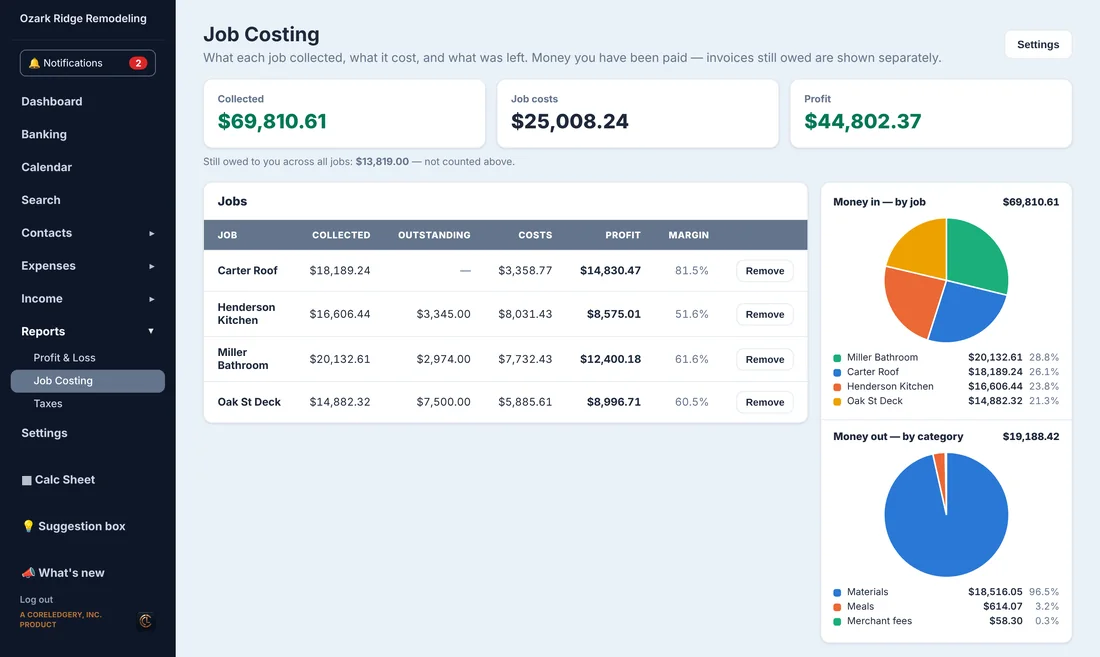
Each job shows what it collected, what it cost and what was left, with the margin as a percentage. Money still owed on its invoices is shown beside it and kept out of the profit.
Click a job to see where the money went: a bar chart by category you can open into subcategories, and a pie of every dollar the job collected split into costs and profit.
- Per-job profit and margin
- Bar chart by category and subcategory
- Pie of every dollar collected
- Still owed shown separately, never counted as profit
Crew hours count too
Hours from the Time Sheet are counted as a job cost at each person’s hourly rate, so a job is not profitable just because nobody counted the labor. Turn it off if you prefer.
Owner draws are shown on their own line and never taken out of a job’s profit twice.
- Labor from the Time Sheet at each person’s rate
- Owner draws kept separate
- Choose which bank accounts count
- An overview of all jobs, and a page for each one
Questions
Do I have to tag every transaction?
No. Tag the invoice and its payments and fees follow. For bills and card charges, pick the job from the list when you enter or review them.
Does it count my crew’s time?
Yes. Hours logged against a job in the Time Sheet are counted at each employee’s hourly rate. Salaried people are not guessed at.
Which plan includes job costing?
Job Costing is in the Crew plan at $54 a month and the Business plan.
See it with a real-looking business.
Open the demo, click around, change anything. No sign-up, and it resets for the next person.